One of the pipeline stages was using 34,691 input tokens per call. After adding one sentence to the prompt, it dropped to 16,520. Same model, same input, same context. The model had been running bash commands I never asked it to run.
The discovery
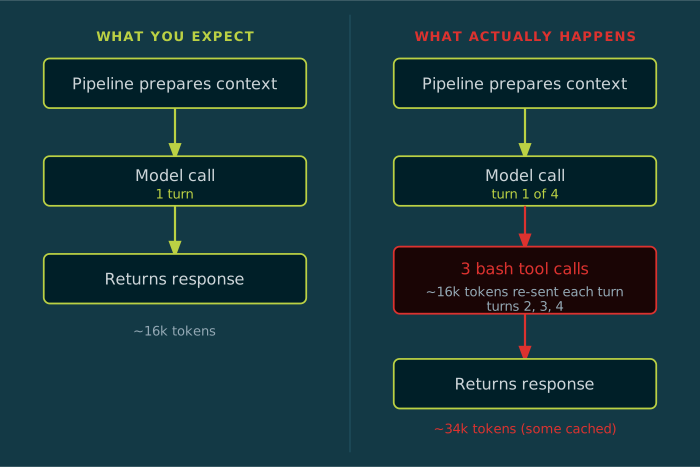
I was checking the call log after a run and noticed turns: 4 on what should have been a single-turn call. In Claude subscription mode, turns > 1 means the CLI made internal tool calls (bash commands, file reads, writes) inside the session. I had not asked for any of that. The prompt tells the model to analyse the provided context and return a JSON response. Nothing about running commands.
But claude -p is Claude Code. It has tools: bash, read, write, web search. Even with --system-prompt "" suppressing the default instructions, the model still has access to those tools. This is easy to miss if you treat claude -p as a simple text-in/text-out interface. When you give it a prompt that mentions code symbols and file paths, it decides to be helpful and look things up itself.
The cost
Each internal turn re-sends the full context. This stage’s context is around 16k tokens: system prompt, symbol data, task description, project rules. With 4 turns, that is around 64k tokens of input, though the log reports 34k because some comes from cache. The real cost is not just tokens. It is the 3 redundant lookups that the pipeline had already done before the model call. The pipeline resolves all the symbols mentioned in the task, passes the results as context, and then the model goes and looks up the same symbols again on its own.
Duplicate work, invisible unless you check turns in the call log.
The change
One sentence added to the prompt, injected only in subscription mode:
Do not use any tools. Do not run bash commands, do not look up symbols, do not read files. All the context you need is provided below. Work from it directly.
In API mode, tools are only available if you explicitly pass them in the request. The model gets a single HTTP request with the prompt and returns a response. The fix is conditional: subscription mode gets the constraint, API mode gets nothing.
The result
| Metric | Before | After | Delta |
|---|---|---|---|
| Input tokens | 34,691 | 16,520 | -52% |
| Output tokens | 2,754 | 1,760 | -36% |
| Duration | 54.0s | 34.0s | -37% |
| Turns | 4 | 1 | Fixed |
One turn is the floor: the model receives the prompt and returns the response. The 3 extra turns were redundant tool calls it initiated on its own. The model found the same files, the same symbols, and produced the same structure. It did not need the extra lookups.
Applied across all stages
The Planner stage was the worst case (largest context, most temptation to explore), but every stage had the same exposure. All run in subscription mode with bash available. The constraint was applied to every prompt template and wired through a shared helper. In API mode, it does not apply and adds no overhead.
The principle
Treating
claude -pas a text-in/text-out interface does not make it one. Claude Code has tools. Those tools cost tokens, add latency, and produce side effects your pipeline did not account for.
The cheapest fix is prompt suppression, telling the model not to use tools. That’s what I did here, and it works, but it relies on prompt compliance. A step up is --system-prompt "", which suppresses the default Claude Code system prompt without removing tool access, it just removes the instructions that tell the model how to use them. The structural fix is API mode: a stateless HTTP request where tools are only available if explicitly included. By default the model has no bash, no file access, nothing beyond generating text. Output quality for these stages in API mode is unconfirmed until tested under production conditions.
For R&D and subscription-based development, option 1 is sufficient. For production, option 3 is the right answer.
What to check in your own pipeline
Look for num_turns or turns in your call logs. If any stage shows turns > 1, the model is making internal tool calls. Each extra turn re-sends your full context and adds latency. You may be paying 2-4x what you think.