A category filter ticket passed on the first run. 55,556 tokens, one Coder attempt, clean APPROVE. Two days later, same ticket, same codebase, same pipeline config: it failed at the Test Writer stage.
The instinct when this happens is to call it a regression, but a regression implies something changed. Nothing changed. What the second run revealed was that the first run had been relying on the model making the right call, and on the second run it did not. That is a different kind of failure.
The feature
The ticket added category filtering to the posts API. GET /api/posts?category=typescript returns only posts tagged with that category. The Planner had to identify the posts handler and the categories lib as the relevant scope, and reason that this was a cross-domain change: the posts handler would import from the categories lib for the first time.
On the first run, it handled all of that correctly. The Test Writer produced a test file for the new route, the Coder implemented the handler change on attempt 1, the Reviewer approved. 61 seconds from ticket to committed code.
What the Test Writer produced on the second run
The second run failed at the Test Writer stage. The test file it produced included this line inside a test body:
const categories = require('@/lib/categories');This is valid JavaScript syntax. On a TypeScript project configured for ESM with "module": "esnext" in the compiler config, it is the wrong tool for the job.
The test runner executes files as ES modules. require() is a CommonJS function. It runs, but the resolver it uses is Node’s native CommonJS resolver, which has no knowledge of path aliases like @/. The test runner’s alias configuration only applies to import statements processed through its own transform. require() calls bypass that entirely and go directly to the native resolver.
The error
FAIL  tests/posts-category-filter.test.ts > GET /api/posts with category filter > returns posts filtered by category slug

Error: Cannot find module '@/lib/categories'
Require stack:
 - /workspace/tests/posts-category-filter.test.ts

 ❯ tests/posts-category-filter.test.ts:7:30

 Test Files  1 failed (1)
      Tests  1 failed (1)
lib/categories.ts existed. It was correctly indexed in the registry. The Planner had used it to scope the manifest two minutes earlier in the same run.
The error is identical to what you would see if the file did not exist at all.
The failure chain
The Debugger received the test output and the code on disk. Its job is to diagnose logic failures from evidence: the failure message, the implementation, the manifest scope. What it received said Cannot find module '@/lib/categories'. The most direct reading of that evidence is that lib/categories.ts is missing.
The Debugger diagnosed a missing file. The Coder, following the diagnosis, attempted to create lib/categories.ts. The write gate compared the attempted path against the manifest. lib/categories.ts was not listed. The pipeline halted.
Three stages ran correctly before the Debugger produced a plausible diagnosis from misleading evidence. The source of the misleading evidence was a single require() call in the test file, which produced an error indistinguishable from a genuinely absent module.
Why the first run was not confirmation
The Test Writer has a general rule about import style. On the first run, the model applied it correctly and used import throughout the test file. On the second run, the same model with the same prompt used require() in one location inside a test body.
LLM outputs are not deterministic. A rule in a prompt is a rule the model tends to follow. It is not a constraint the pipeline enforces. That distinction only becomes visible when the model does not follow the rule, which happens non-deterministically across runs, with no warning and no change in configuration.
The first run passing was evidence that the prompt rule usually works. It was not evidence that the pipeline enforces it. The difference between those two things is invisible until the second run.
The change
The pre-flight stage now detects the project’s module format automatically. If the project uses ESM, the Test Writer receives a specific constraint for that run: this is an ESM project, use top-level import statements throughout, never require() inside test bodies.
This is not a general rule about good practice. It is a specific instruction derived from the project itself, applied at the start of every run. The model does not have to recall the rule or generalise from a prior example. The system reads the project and tells it what applies.
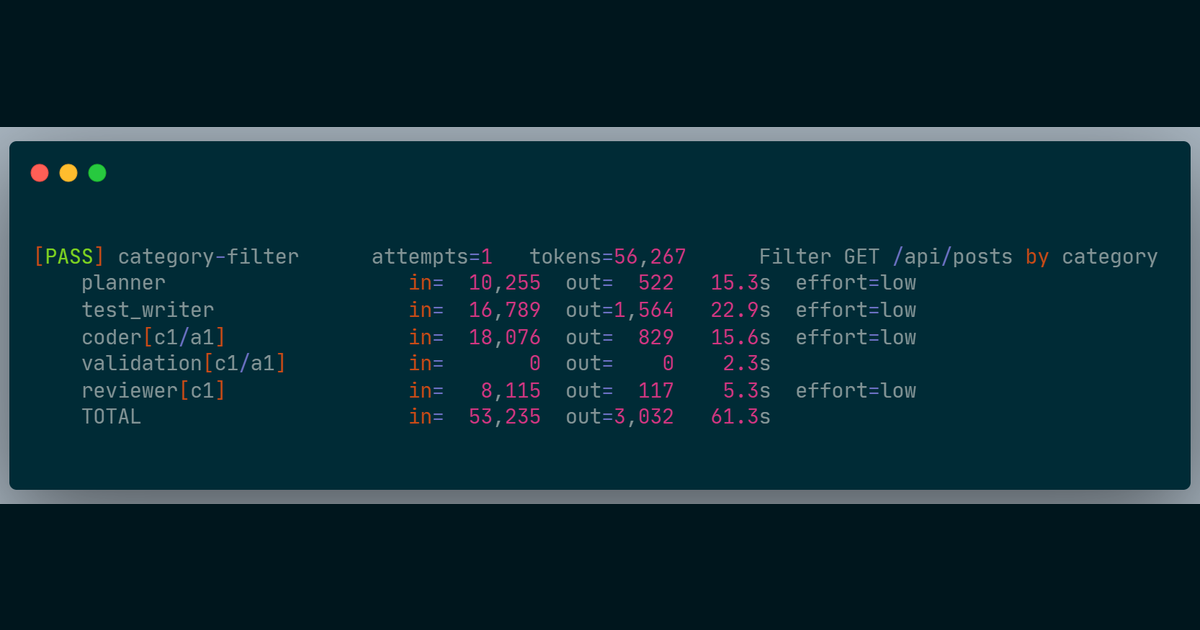
On the re-run after the fix: APPROVE, one Coder attempt, 56,267 tokens, 61 seconds. The Test Writer produced correct import statements throughout.
The generalizable part
A prompt rule and a structural constraint look identical inside a prompt. The difference is in the failure mode.
A prompt rule can fail on any run where the model’s output drifts from what the rule intended. The failure is silent: the output is syntactically valid, it passes no gate until the test suite runs, and the resulting error looks like a different problem entirely. You are debugging a missing-file error when the actual cause is an import style violation two stages upstream.
A structural constraint derived from the project’s own configuration works differently. If the config file is present, the constraint fires on every run, without relying on the model’s consistency across invocations. If the config file is missing, the constraint is not injected and the pipeline behaves as before, which is honest, because there is nothing to derive.
The practical question when writing a prompt rule is: what happens when the model ignores it? If the answer is a silent failure that looks like a different problem downstream, the rule is carrying less weight than it appears to be.
For a property that must hold on every run, the reliable approach is to derive it from something the system can read, not something the model is expected to recall.
What this does not solve
Project config detection only works when there is a config file to read and the relevant constraint is expressed in it. A project with a non-standard build setup, or one where the build tooling diverges from what the compiler config declares, produces no injected rule. Prompt coverage is the only protection in those cases, and it carries the same non-determinism as before.
The blog fixture is well-structured and uses standard TypeScript configuration. Whether this approach holds on projects where the build tooling and compiler config are out of sync is not yet tested. That is the next class of failure to find.
Numbers are from real runs against a TypeScript blog API fixture. The pipeline runs inside Docker. Still R&D.